
Use case
Answe for Any Business
Customers ask, Answe acts. Quote requests, bookings and orders handled in one chat on your website — and every one lands in an inbox where you can keep talking.
Free plan. No credit card required.
Why Answe for Any Business
One tool, many use cases
Swap between forms, chat, bookings and commerce without new tools.
Works with your site
Plain HTML embed — no platform lock-in.
Start free
Free plan with up to 100 responses per month.
Grow with you
Scale up when you’re ready.
How it works
Generic Businesses — Chatbots, Customer Support, and Feedback Collection
Introduction
Every business benefits from better customer communication. Answe widgets work for any business type — add a chatbot to answer common questions, collect customer feedback, provide support, or guide visitors through your services. No industry-specific setup required.
How It Works
Customer Support Widget
Create a support widget that handles common requests:
"How can we help?"
  ├── "Product question"  → AI agent answers from your FAQ
  ├── "Order status"      → Form to look up order
  ├── "Return/exchange"   → Guide through return process
  ├── "Other"             → Contact form → Inbox
Feedback Collection
Add a Feedback flow to your link:
- "How was your experience?" with rating options
- Follow-up question based on rating
- Optional text field for detailed feedback
- Thank you message
FAQ Chatbot
Set up an AI agent that answers frequently asked questions:
- Business hours and location
- Pricing and services
- Policies (returns, shipping, cancellation)
- Product information
Visitor Engagement
Turn passive visitors into engaged contacts:
- Pop-up widgets with engaging questions
- Lead capture forms after meaningful interactions
- Newsletter signups with preference selection
Real-World Scenarios
SaaS company: A widget on the pricing page answers questions about plans, features, and billing. An AI agent qualifies leads and routes them to sales.
Local business: A simple widget on the homepage collects inquiries — directions, hours, and service questions are answered automatically.
Non-profit: A widget collects volunteer signups with availability preferences and contact information.
Key Benefits
- Reduce support load — AI handles common questions
- Capture leads — Turn visitors into contacts
- Collect feedback — Understand customer satisfaction
- Always available — Widget works 24/7
- Easy setup — No technical knowledge needed
- Works for any business — Flexible enough for any industry
Getting Started
- Go to answe.com/start, choose what customers should do (quote, book or order) and describe your business — test the flow, then claim your link
- Add options matching your most common customer questions
- Add AI agents for FAQ, forms for data collection
- Share your link — Instagram bio, WhatsApp, email signature, or a QR code at the counter
- Monitor responses in your inbox and the Answe app
- Optional: embed the same flow on your website
Related
- AI Agents — Automate responses
- Chat Inbox — Manage conversations
- Forms & Surveys — Collect feedback
- Analytics & Insights — Track engagement
Manage it all on the go
Every answer, booking and lead lands in the Answe app — reply from your phone before the competition even checks email.
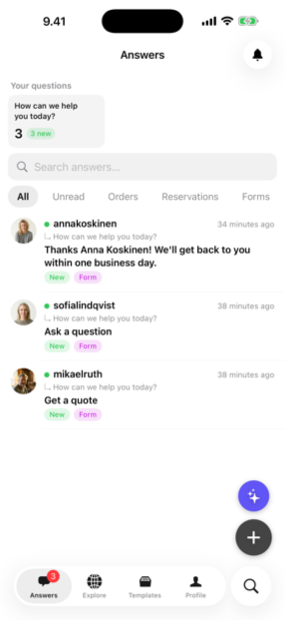
Trusted by businesses in Helsinki and beyond


Every plan takes bookings. Pay for volume, not features.
Frequently asked questions
Can I use multiple widget types at once?
Yes — as many as you need.
Is there a setup fee?
No. Free plan starts immediately.
Templates for any business
Working flows you can try and copy in one click.
Client intake · business
Accountant client onboarding form
Collect the brief, the files and the budget before the first call — one link, one chat, nothing to chase.
 Sample: Tilitoimisto Tase
Bookings · business
Accountant consultation booking widget
Take real consultation bookings for bookkeeping and tax return from one link — the slot is reserved the moment the client confirms, and it lands in your inbox.
 Sample: Kirjanpito Klaara
Enquiries · business
Accountant contact form
A contact form that answers: the common question instantly, a call back at the right time, and everything else as a chat you can continue.
 Sample: Northbook Accounting
Quote requests · business
Accountant quote request form
Turn "how much would it cost?" into a complete request — description, photos, timing and budget — before you type a single reply.
 Sample: Ledger & Lane